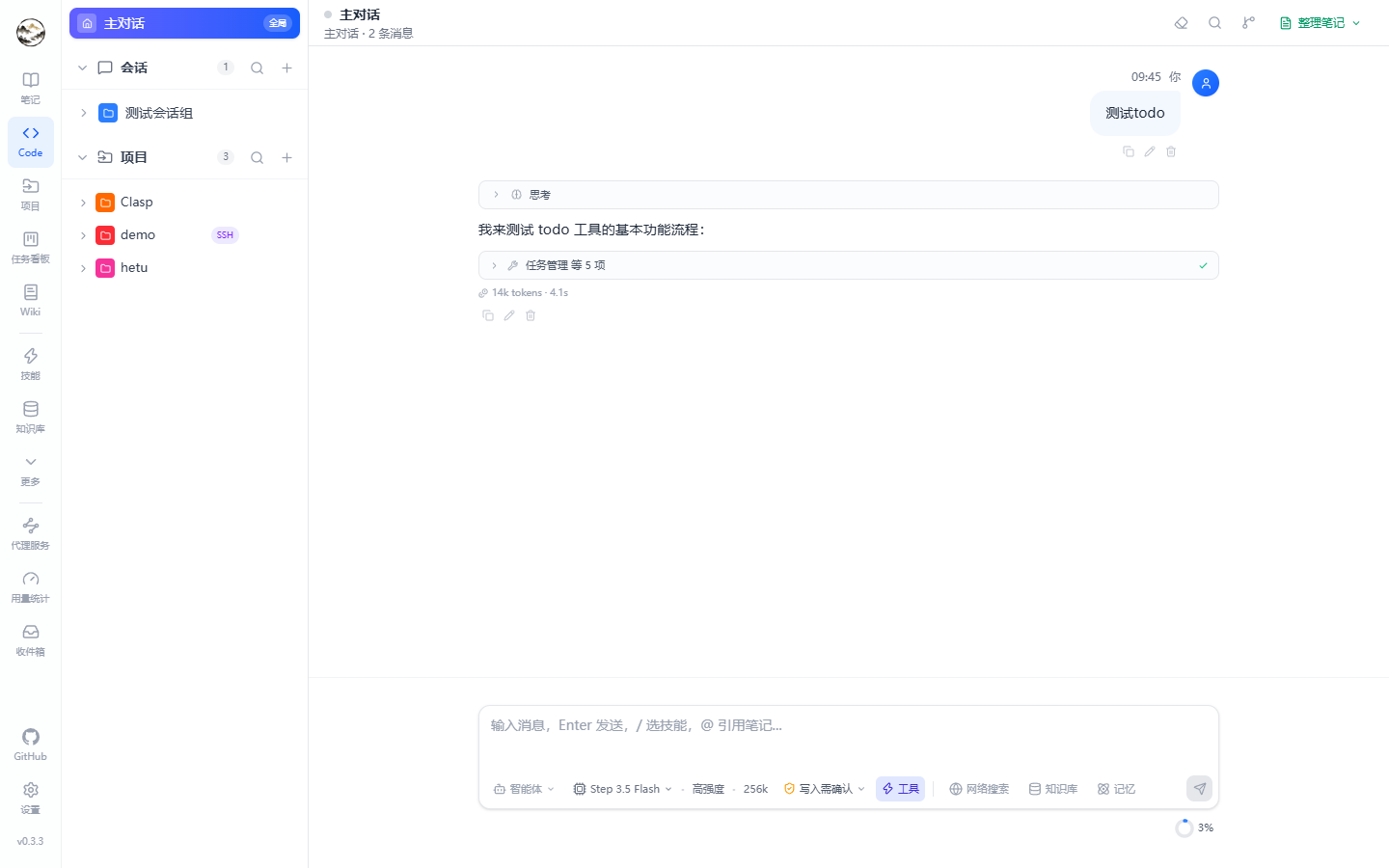
Entry point: Code in the left navigation (route /code). Chat and coding sessions share one screen: a group / topic / session tree on the left, the message stream on the right. /chat and /work redirect here.
Click for full size
Sessions and topics
Concept
Behaviour
Group
Container for topics, used to partition by theme or project
Topic
Own model, system prompt, context window and history; any message can be forked into a new topic
Lazy creation
New sessions / topics only take a placeholder slot — nothing is written until the first message is sent (the title comes from its first 50 characters)
Message actions
Copy, edit and resend, delete; thinking traces collapse; long replies can be copied as Markdown
Streaming events
Replies stream over SSE and the UI renders each event type in its own block:
Event
UI
delta
Incremental body text
thinking
Collapsible reasoning trace (when deep thinking is on)
tool call / result
Tool name, arguments, output summary, expandable
web / knowledge / memory hits
Hit list (title plus snippet) that links back to the source
todo plan
Structured plan from the todo tool, checked off live
steering
Shown when a mid-run instruction is accepted
checkpoint
File snapshot taken before a task
approval request
Risky operations ask for confirmation inline
Input toolbelt
Control
What it does
Web search
Rewrites the query, searches, and injects results with citations
Knowledge base
Vector recall over indexed notes, files and URLs
Memory
Recalls long-term memory scoped to global ∪ current session ∪ current project
Permission mode
plan / readonly / ask / auto / bypass (see below)
Model
Temporary model override for this request
Agent
Apply a prompt preset (may bring its own tool allowlist and approvals)
Reasoning effort
Low / medium / high — controls thinking and tool depth
/ menu
Type / to invoke a skill or agent
Attachments
Images (for vision models) and files; very long pastes collapse into a block
Permission modes
Mode
Allowed
plan
Planning and discussion only — no file writes, no side-effecting commands
readonly
Read files and run read-only commands
ask (default)
Every write or sensitive command asks for approval first
auto
Routine operations run directly; sensitive ones still ask
bypass
Everything allowed — only sensible in disposable environments
Code sessions additionally have a run mode: interactive (confirm step by step) or Autopilot (run to completion). Approval granularity is configured per tool on the Agents page.
The agent loop: each iteration drains steering first, then calls the model, checks permissions, runs tools and streams progress over SSE; queued messages start the next turn.
Queue and mid-run steering
Queue: messages sent while a reply is streaming wait in a queue bar — edit, delete, send immediately, or let them fire after the current turn.
Steering: inject an instruction into the running turn; the agent picks it up at its next loop iteration. Useful for “stop touching that file”.
Context and compression
The ring indicator shows current context usage; compression can trigger near the threshold and posts a notice above the input.
Compression is driven by the pipeline configuration (when to trigger, target size, which model summarizes); both pre- and post-compression tokens are recorded in usage.
What a request carries
Field
Values / effect
Permission mode
plan / readonly / ask / auto / bypass — decides whether tools need approval
Run mode
interactive / autopilot (code sessions)
Toggles
webSearch / knowledgeBase / memory / deepThinking
Reasoning effort
low / medium / high
Model and agent
Per-request model override; an agent contributes its system prompt, tool allowlist and approvals
Attachments
Images (multimodal) and files; very long text collapses into a block before sending
These toggles are cached per session in localStorage, so reopening a session restores the last state.
Distill a topic into a note
Four styles: summary, detailed, Q&A, or a custom prompt; streaming preview plus a notebook picker before saving.